
What Events does
Events is a full event system: a public event page, ticket types with prices and limits, coupon codes, a checkout, automatic emails before and after, and QR check-in from the mobile app. Every person who registers becomes a contact, so your follow-up runs like any other lead.
Create it and pick the type
Go to Client Apps > Events and click Create your event. Ticketed sells tickets with one or more price tiers. RSVP is free, guests just confirm.
Client Apps› Events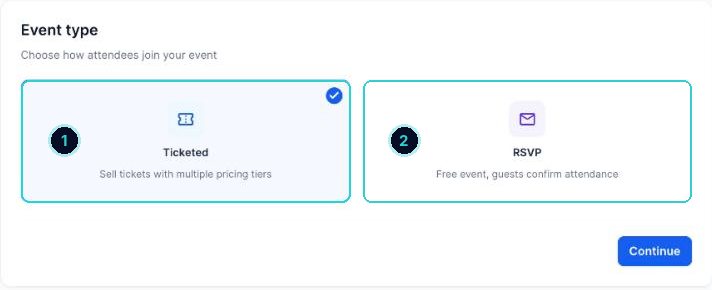
1 ticketed, 2 RSVP. Details
Name, cover image, a one-line summary (shows in listings, 160 characters) and the full description.
Summary[What it is] for [who]. [One reason to come]. [Date], [suburb].DescriptionJoin us for [event] at [venue]. What's on: - [Thing 1] - [Thing 2] - [Thing 3] Who it's for: [who]. Parking and access: [details]. Questions? Reply to your confirmation email or call [phone].Date, place and host
Set the start and end, time zone and time format. Choose In-person (search the address) or Online. Add the organiser name, email, website and phone. Then Create event. It's saved as a draft.
Follow the checklist
The Overview tab shows what's left: create tickets, connect payments, review the checkout form, notifications and pages, then publish.
Add tickets
Tickets > Add Ticket Type. Name it, choose Fixed price or Free, set the price in AUD, quantity, max per order and the sale period. Advanced settings has a short description and whether it's shown or hidden. Coupon Codes sits next to Ticket Types.
Ticket namesEarly bird General admission VIP (includes [extra])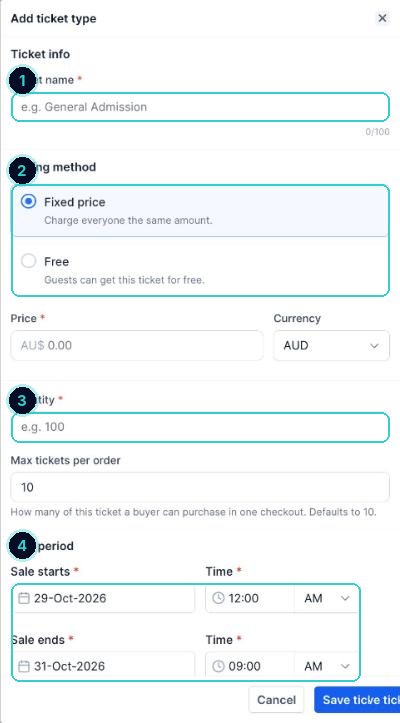
1 name, 2 paid or free, 3 how many, 4 when sales open and close. Settings
Registration: the deadline, an overall venue capacity, QR check-in and whether to collect each guest's name. Payments: live or test mode. Notifications: what organisers and guests get. Link & tracking: the event's web address and your Meta pixel.
Make the page look right
Pages & design controls the event page, schedule and checkout. Drag sections up or down, switch them off, add FAQs, a schedule and speakers, and check desktop and phone. Copy from another event saves time next time.
Preview, then publish
Click Preview, run a test registration in test mode, then Publish event. Share it from the menu, or embed it on your website or funnel.
A live event page that sells, reminds and checks people in, with every guest in your contacts.
Next up
People who did this also asked
Run a free event with RSVPs
No tickets to sell, just a clean page where people say they're coming.
- 1Choose RSVP
- 2Fill in the basics
- 3Cap the numbers
Check guests in at the door
Scan each ticket's QR code with the mobile app, and watch attendance live.
- 1Turn on QR check-in
- 2Use the mobile app
- 3Watch it live
Event emails: confirmations, reminders and the thank-you
What gets sent automatically, when, and how to change it.
- 1Open notifications
- 2For you
- 3For guests
Which calendar do I need? Every type explained
Personal, round robin, class, collective, event calendar, service booking, rentals or Events. Pick in 30 seconds.
- 1Where they live
- 2Personal booking: just you
- 3Round robin: share the work