
Dashboard or report?
A dashboard is live and on screen. A custom report is a document: several pages, your commentary, and it can be sent automatically on a schedule. Use reports for monthly reviews and for anyone who never logs in.
Start a report
Go to Reporting > Custom reports and click Create your first report (or + New).
Reporting› Custom reportsPick a starting point
Blank, a template from the library, a clone of one you've made, or import a dashboard you already like.
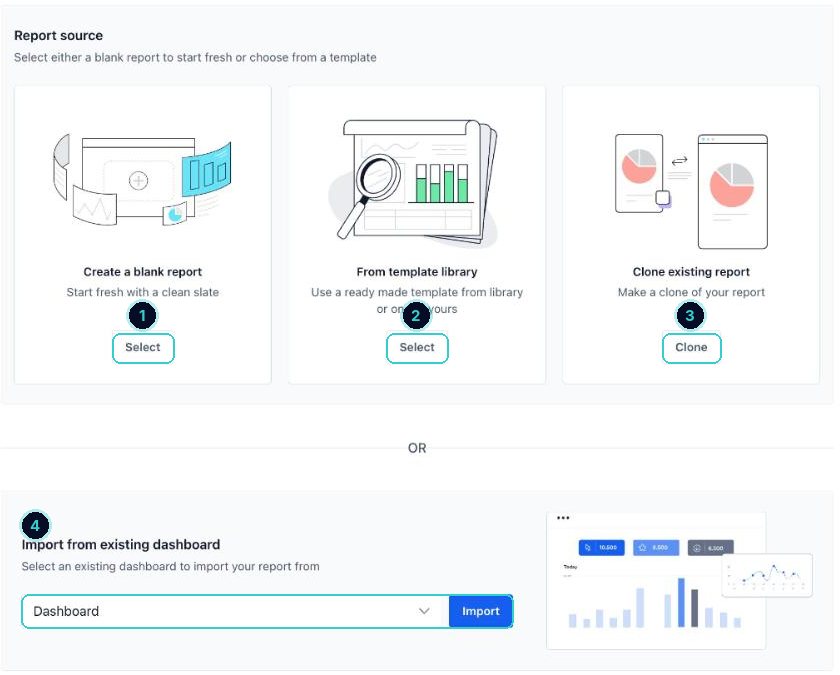
1 blank, 2 template, 3 clone, 4 import a dashboard. Add the pages and charts
Drag in charts and tables, add text boxes for your takeaways, and set the date range.
Write the takeaway at the top
People read the first line. Put the point there.
Takeaway templateThis month: [leads] leads, [bookings] booked, $[revenue] won. Best source: [source]. Fix next month: [one thing].Schedule it
Set a delivery schedule and the people it goes to, so it lands in inboxes on the first of the month without you touching it.
A clean monthly report that sends itself.
Next up
People who did this also asked
Set up your dashboard so it shows what matters
Pick the numbers you check every week, filter by date, and get an AI summary in plain words.
- 1What the dashboard is for
- 2Make your own dashboard
- 3Edit and add widgets
See where your leads came from
Which ads, pages and channels brought enquiries, and which turned into money.
- 1Open attribution
- 2Pick the dates
- 3Compare