
What a custom field is
Every contact has standard boxes: name, phone, email. A custom field is a box you add for something your business needs, like Job type, Pet's name or Renewal date. Once it exists, forms can fill it, workflows can use it, and you can filter and personalise messages by it.
Fields belong to a record type
A field sits on a contact, an opportunity, a company or a task. Pick the one where the detail lives. A contact's birthday goes on the contact. A job's value goes on the opportunity.
CRM› Custom Fields1 See it on the App mapFolders keep the contact tidy
Folders are headings on the contact record, like Job details or Preferences. Related fields sit together instead of in one long list. Make the folder first with Create folder.
Create the field
Click Create field, choose the type, the record, the name and the folder. Pick the type carefully: a Dropdown keeps answers consistent so you can filter by them later; Single line is free text.
Example fieldJob typeDropdown optionsBlocked drain Hot water Leaking tap Gas fitting Other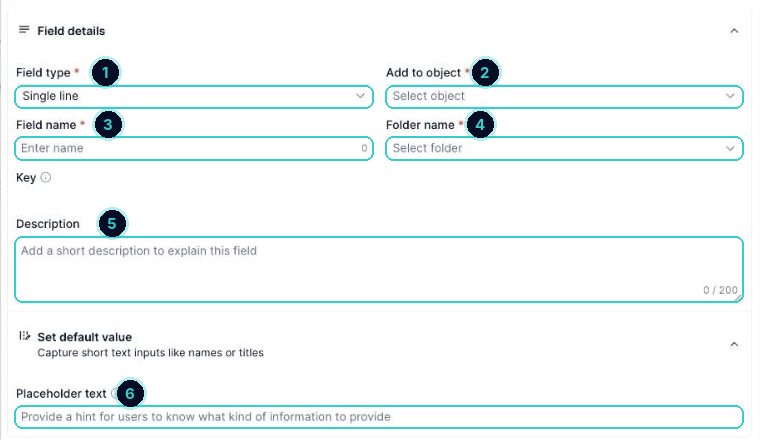
1 type, 2 which record, 3 name, 4 folder, 5 description for your team, 6 hint shown in forms. Use the key anywhere
Each field gets a key like {{contact.job_type}}. Paste it into a text, email or page and it fills in that contact's answer.
Locked fields
Fields with a padlock are built in. You can't delete them, but you can still use them.
The details your business cares about live on the contact, ready for forms, filters and personalised messages.
Next up
People who did this also asked
Custom values: change it once, update it everywhere
A custom value is one piece of business info (your booking link, phone, address) that every message and page can reuse.
- 1Fields vs values
- 2Open them
- 3Add the ones every business needs
Smart lists: segment your contacts and why it pays
Save a filtered view of your contacts (like 'customers from last year who haven't booked') and message only them.
- 1Why segment
- 2Open contacts and filter
- 3Segments worth saving
Put an enquiry form on your website
Build the form, copy it onto your site, and every enquiry lands in Contacts.
- 1Build the form
- 2Add the fields
- 3Add your notice and consent