
How service booking works
Instead of one calendar per service, you build a menu. Each service has its own price, length, staff and photo. The booking page shows the menu, the customer picks, and only the staff who do that service are offered.
Open Services
Go to CRM > Calendars > Services. The tabs across the top are Services, Staff, Locations, Booking pages and Global settings. The Onboarding start guide walks you through them in order.
CRM› Calendars› Services↗ See it on the App mapMake categories first
Click + New category for each group on your menu, like Cuts, Colour, Treatments. Drag them into the order you want; the booking page follows it.
Add each service
Click + New service. Add a photo, name, colour, category and description, then pick the staff, price and duration. Tick private if it shouldn't show on the menu (you can still send its link).
Service nameCut and blow dryDescriptionWash, precision cut and a blow dry finish. Allow 60 minutes. Long hair may need extra time.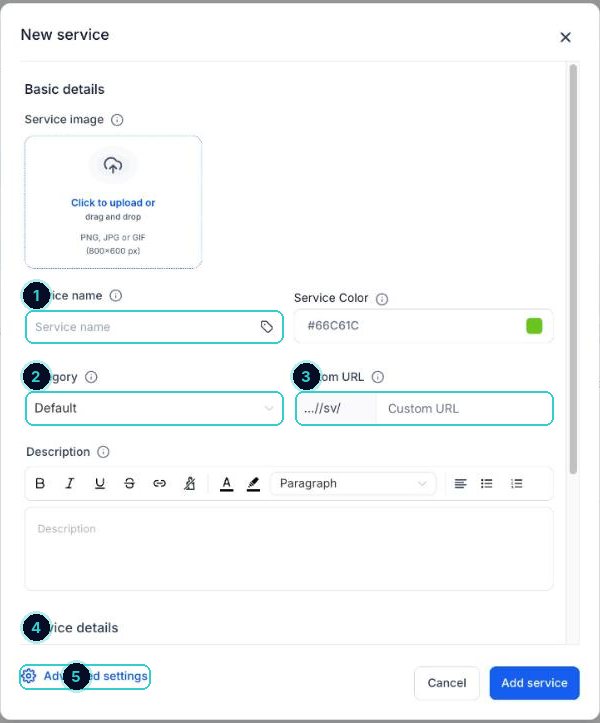
1 name, 2 category, 3 its own link, 4 staff, price and length below, 5 advanced settings. Set staff hours and locations
On the Staff tab, set each person's working hours. On Locations, add your address (or each branch).
Publish the booking page
On Booking pages, create the page customers use, then View booking page to test it and share or embed the link.
Global settings
Set the rules that apply to every service: notice, how far ahead, cancellation and reschedule policy, and notifications.
A proper booking menu like the big salon apps, inside revenu.
Next up
People who did this also asked
Which calendar do I need? Every type explained
Personal, round robin, class, collective, event calendar, service booking, rentals or Events. Pick in 30 seconds.
- 1Where they live
- 2Personal booking: just you
- 3Round robin: share the work
Take a deposit when someone books
Ask for a deposit or full payment up front so no-shows cost them, not you.
- 1Connect your payment account
- 2Open your calendars
- 3Edit the calendar
Let clients cancel or reschedule, and set a policy
Give customers a link to change their booking, with your rules on how late they can do it.
- 1Open the policy settings
- 2Set your rules
- 3Write the policy
Send appointment reminders
A text or email goes out when someone books, so fewer people forget.
- 1Create a workflow
- 2Start it when someone books
- 3Add the reminder