
Connect your payment account
If you haven't already, connect Stripe or your payment provider. Bookings can only take money once this is done.
Commerce› Payment IntegrationsOpen your calendars
Go to Meeting Calendars. Use the breadcrumb at the top to jump there from anywhere in CRM.
CRM› Calendars› Meeting Calendars1 See it on the App mapTurn on payments and set the amount
Open Advanced settings, then Payments. Switch on Accept payments (1), choose Charge upfront or Save card on file (2) and set the full price (3). For a deposit, switch on Accept partial payment (4) and enter the amount or percentage (5). Then Save changes.
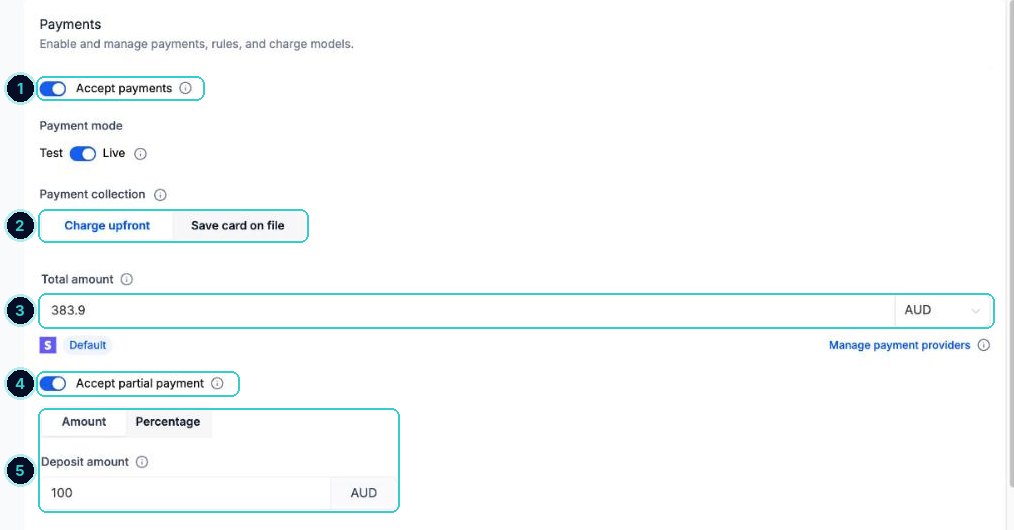
Advanced settings > Payments tipSay how much is refundable and when, in the calendar description. Customers should know before they pay.
Book a test
Open the booking link yourself and go through to the payment step, so you see exactly what customers see.
The booking page asks for payment before it confirms, and the payment shows against the appointment.
Next up
People who did this also asked
Share your booking link or put it on your website
Get the link for texts and emails, or put the calendar straight on your site.
- 1Open Meeting Calendars
- 2Click Share calendar
- 3Copy the link for messages
Customers say there are no times to book
Find out why a calendar shows nothing, and fix it.
- 1Open Meeting Calendars
- 2Check it's active
- 3Run Troubleshoot calendar