
Open Phone System, then Voice
Go to Settings > Communications > Phone System and click the Voice tab (1).
Settings› Communications› Phone System› VoiceOpen Missed Call Text Back
Click Voicemail & Missed Call TextBack (2), then Missed Call Text Back on the left (3).
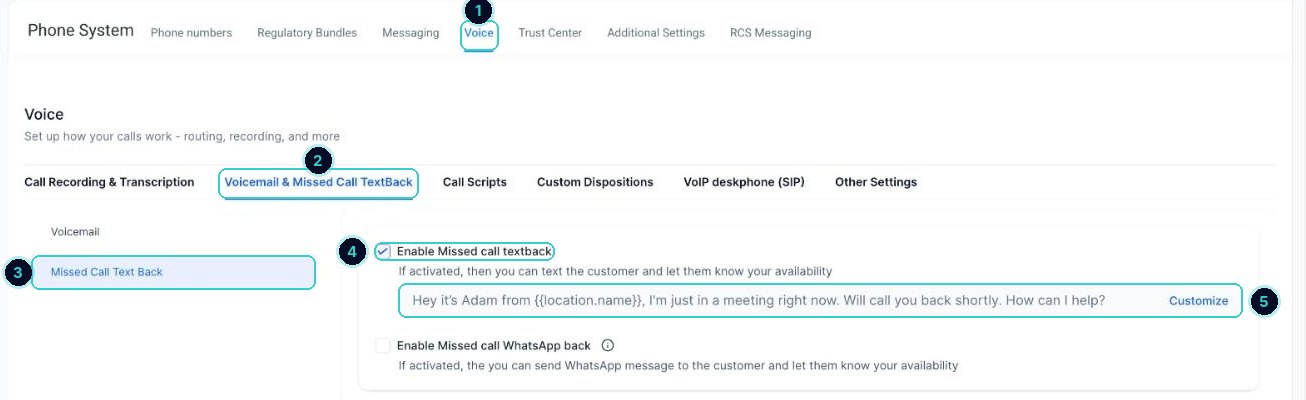
Settings > Communications > Phone System > Voice Tick Enable Missed call textback
Tick the box (4). There's a WhatsApp version underneath if your customers use WhatsApp.
Write the message
Click Customize (5). Keep it short and say who you are. Copy this one and swap in your name and business, then save.
MessageSorry I missed your call, it's [your name] from [business]. What can I help with? Reply here and I'll get back to you shortly.Test it
Ring your number from another phone and let it go unanswered. The text should arrive within seconds, and the reply lands in Conversations.
When it's done
Unanswered callers get your text, and their replies show up in Conversations.
Did this match what you see?
Next up
People who did this also asked
03start here
Reply to customers from one inbox
Texts, emails, chats, calls and socials, all in one thread per customer.
- 1Open Conversations
- 2Start with Unread
- 3Open the customer
5 min · 5 steps
01most asked
New leads aren't coming through
A form, chat or call went quiet. Work down this list before anything else.
- 1Send a test from your phone, off the office wifi
- 2Check the contact landed
- 3Look in spam and promotions
10 min · 6 steps