
Where everything lives
Marketing > Reputation has Overview, Requests, Business Reviews, Video Testimonials, Widgets, Listings, Google Business Profile optimisation and Reputation Settings.
Marketing› ReputationWay 1, native requests: simplest
Click Send Review Request on a contact or from Reputation, and revenu texts or emails them your review link. In Reputation Settings > SMS Requests you choose when it sends, whether to repeat until clicked, and the most retries.
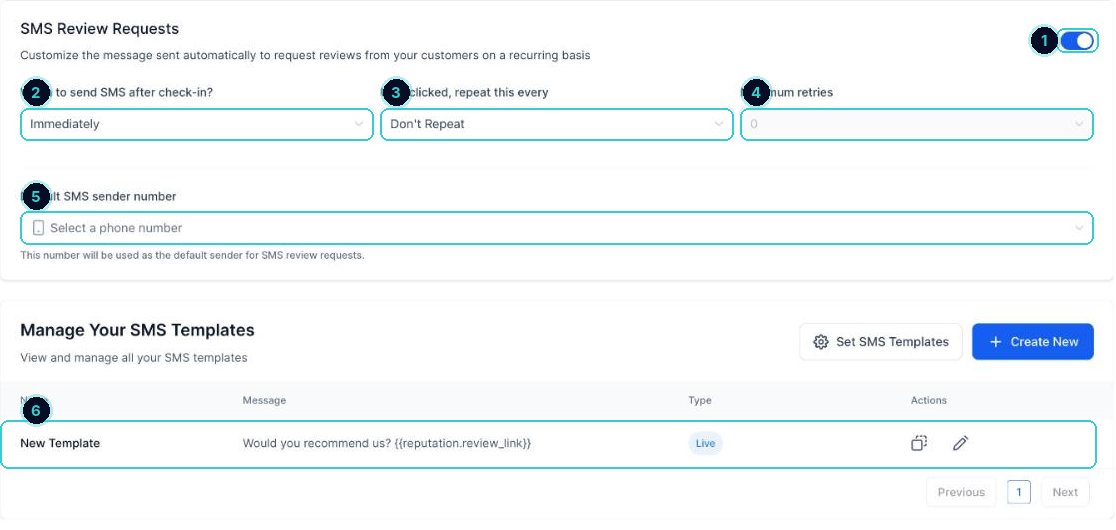
1 on, 2 when, 3 repeat, 4 retries, 5 sender number, 6 the message. The message to use
Edit the template so it sounds like you. {{reputation.review_link}} becomes your review link.
SMS requestHi {{contact.first_name}}, thanks for choosing [business]. Would you mind leaving us a quick review? It really helps a small local business: {{reputation.review_link}} Reply STOP to opt out.Email request subjectHow did we go, {{contact.first_name}}?Way 2, a workflow: most control
Build a workflow that starts when the job is done (appointment showed, opportunity won, invoice paid), waits a few hours, sends the review request, and follows up once if they didn't click. Use this when timing should follow the job, not a manual click.
Which to use
Native: you're small and send requests by hand after each job. Workflow: you want it automatic, tied to a stage or payment, with your own follow-up. Don't run both for the same customer or they'll get two asks.
Reply with AI
Reputation Settings > Reviews AI: Suggestive drafts a reply for you to approve, Auto Responses posts it after the wait time you set, Off stops it. Suggestive is the safe start.
Show reviews on your website
Reputation > Widgets builds a reviews widget. Copy its code into your website or funnel so new reviews appear on their own.
Deal with spam reviews
Reputation Settings > Spam Reviews lists reviews flagged as spam so you can check them before they hurt your rating.
Reviews come in on autopilot, get answered fast, and show up on your website.
Next up
People who did this also asked
Ask for a Google review after a job
Send a review request by text or email, or have it go out after every job.
- 1Connect Google (and Facebook if you use it)
- 2Set the request message
- 3Send one now
Reply to Google reviews, and handle a bad one
Answer every review from one place, and deal with a bad review without making it worse.
- 1Connect Google
- 2Open your reviews
- 3Reply to the good ones
Connect your Google Business Profile
Pull in your reviews and post to Google from your account.
- 1For reviews
- 2For posting
- 3If it stops working